

Page Contents
What is Computer Vision Syndrome
Computer vision syndrome or CVS represents a group of eye and vision-related problems resulting due to prolonged computer use. The eyes get strained by direct view on a computer screen. Several individuals are prone to the high demands that occur as a result of computer viewing. It is common in office workers, retired people, students, etc., who spend more than three hours a day in from of computer, constituting about 90 % of the total population.
Computer Vision Syndrome Symptoms
Headache
People may get visual or tension headaches in CVS. Visual headache is usually represented by pain over the front of head during the day time; however, this can vary depending upon individuals. It does not occur upon awakening.
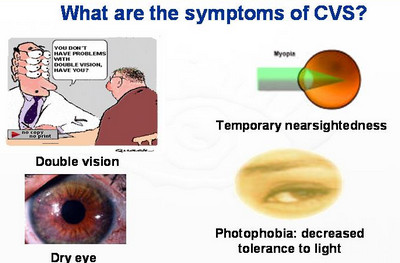
Blurred vision and diplopia
Normally, while gazing on any object, the focusing mechanism gets activated for increasing the eye’s focal power to regain the clear image thus obtained. Thus, the ability of the eyes that enables it to change its focal power is otherwise, called as accommodation; it varies with age. Hence, the inaccurately focused image appears blurred due to this refractive error..
Redness in eyes
Due to strain in the eyes, the lacrimal glands dry up and make the eyes look red.
Eye strain and fatigue
The visual and environmental lead to eye strain in several individuals
Irritated and dry eyes
Limited eye range of motion or continuous concentration in a work can make the eyes dry and irritated as well. Higher the gaze angle while viewing a computer screen, faster is the tear loss.
Neck pain
Visual system experiences a lot of strain. Thus, to avoid that, posture makes some adaptations that are not ergonomically correct.
Neck pain tips for Computer Users
Light sensitivity
Large disparity in the brightness of the viewing field can cause light sensitivity
Difficulty in refocusing of eyes
This happens when people do not deviate from their concentration while working.

Computer Vision Syndrome Causes
Age and sex
In females, the aqueous layer of tear film reduces as the age advances (presbyopia), compared to males
Pathological conditions
Diseases like thyroid, which leads to retraction of lids or causes widening of the inter-palpebral fissures result in increment in, tear evaporation making the eye dry and irritated.
Uncorrected visual problems
Like astigmatism and farsightedness
Diminished blinking
Normally, a human being blinks his eyes to about 18 times in a minute. Computer users blink to a lower rate of around 4 times per minute only.
Environmental factors
- Poor lighting: The glare coming from the large window class and overhead fluorescent lights causes discomfort to the eyes
- Improper viewing distance and posture
- Angle gaze
- Glare on the computer screen
- Desktop color and type, especially the one made of cathode ray tube
- Window proximity
- Room humidity
Computer Vision Syndrome Glass
Depending on the clinical findings and decision of the consulting doctor, CVS may require correction with the CVS glass.
- Computer eye wears differ from the ordinary eye glasses
- They are basically used for correction of the refractive errors.
- These glasses are light weight and sturdy due to the anti-scratch coatings
- Eye wear reduces the impact of computer related symptoms that stain the eye.
- It has the capability to make the monitor more clear by eliminating the constant refocusing effort that the eyes have to go through while viewing the screen.
- They block the spectrum of artificial light that emanates from the screen, and only allow the natural light.
- If an individual using computer for a prolonged period of time doesn’t use a CVS eye-wear, he may have to suffer the symptoms of CVS. Poor ergonomic postures to compensate the vision problems should not be encouraged, as that can cause serious problems postural deviations.
- Decreased focusing ability is corrected by wearing small plus-powered over-the-counter eyeglasses (+1.00 to +1.50).
List of conditions requiring occupationally related glasses or eye wear:-
- Presbyopia
- Hyperopia (farsightedness)
- Astigmatism (not required for moderate to large severity)
- Heterophoria
- Convergence Insufficiency
- Disorders of Accommodation (for less than 40 years)
- Dry Eye
Computer Vision Syndrome Treatment (Cure)
Preventive measures
There are certain preventive measures that can be followed to avoid computer vision problem. They are as follows:-
Eye Care
- Glasses especially for computer purposes may be of great benefit for people who do not wear glasses in their real life than those who do not, as those glasses may not be sufficient for computer tasks. The person may need addition lens designs, powers, tints or coatings specifically for viewing screen, which has the capability to maximize the visual comfort and abilities.
- Visual training or vision therapy (eye exercises) may be used to improve the visual capabilities, thereby helping remediating deficiencies of eye movement, and reinforcing the eye-brain connection.
- Rest the eyes for about 15 minutes every 2 hours of continuous computer usage.
- Blink eyes between works to replenish the tear film.
- Look at a distant object every half hour between works for providing rest to ciliary muscles by allowing the eyes to refocus.
- Close eyes for 20 seconds every hour for inducing relaxation.
- Use lubricating eye drops in case the eyes get dry.
- Regular eye examinations
Proper technique for viewing the Computer
- Location of computer – the computer screen should be placed at 15 to 20,0 4-5 inches below the eye level or 20-28 inches from eyes.
Seating position: Padded chairs along with arm supports should be used, and the height of the chair should be as to make the feet rest on the floor. - Reference materials – The materials of frequent use should be placed at a level below the screen and above the keyboard. An alternative to this can be a document holder being placed next to the screen, so that; stress free work can be carried out.
- Lighting – Position the computer monitor in such a way to avoid glare from windows or overhead lighting. Always use window blinds or drapes, and the desk lamps bulbs should always be of low wattage.
- Anti-glare screens – If the way for minimizing glare from the light sources fail, then a screen glare filter van be used for decreasing the amount of light that gets reflected from the screen. A dimmer switch or a desk lamp with adequate moveable shades can also be chosen.
Medical therapy
Topical lubricants
- Lacrisert: This artificial tear insert is inserted into the eyes one or two times in a day, which stabilizes and thickens the tear films due to the cellulose contained in it. If not properly inserted, corneal abrasion can result.
- Refresh Tears: It is an Allergan and a lubricant eye drop.
- Systane and Systane Preservative free
Tear replacement therapy
- Cyclosporine A: ophthalmic emulsion/restasis
This increases the tear production in CVS patients by replacing the tear film’s lipid and aqueous components. However, ocular burning sensation can be experienced in a few after its usage.
- GenTeal or (Novartis)
It is also available as a user-friendly nighttime gel.
Consultations
- Engineer consultation at workplace
- Orthopedic consultation
- Physical therapy consultation for associated carpal tunnel syndrome.
Surgical intervention
Surgical interventions for CVS is same as the dry eye syndrome
Punctal occlusion
This is a simple procedure, which will decrease the tears that normally drain off through the eye and eye drainage system.
Lacrimal canalicular plugs or punctal plug insertion.
These plugs are inserted to block the normal tear drainage through the drainage system. Hence, the eyes remain moist even if the tear production is less. These plugs can also be removed when not necessary.
Laser therapy
These are similar to the punctual plugs; in severe cases, these tear drainage system is permanently blocked using laser or cauterization, which may not be reversed.
Lateral tarsorrhaphy
In this procedure, lateral 1/3rd of the eyelids are being sewn together for decreasing the eye’s ability to open widely, thereby assisting in easy eye closure.
References
http://en.wikipedia.org/wiki/Computer_vision_syndrome
http://www.aoa.org/x5253.xml
http://www.webmd.com/eye-health/computer-vision-syndrome
http://emedicine.medscape.com/article/1229858-overview
http://www.computervisionsyndrome.net/
http://library.thinkquest.org/C0123325/synd.htm
http://www.emedicinehealth.com/dry_eye_syndrome/page10_em.htm


